How OsMonitor Helps Businesses Manage Workplace Activity
I think managing a team can be hard, especially when employees work in departments, offices, or from far away. Companies need ways to see how work is done, get better productivity, and keep company resources safe. This is where OsMonitor monitoring software, can help organizations keep track of computer activity from one place.
I think choosing a monitoring solution is not about looking at features. Companies also need to consider data privacy, security, how the software will be set up, and long‑term costs. Some businesses like cloud tools, while others prefer to keep data on their servers. Knowing how employee monitoring software works can help managers make choices. OsMonitor can also help in this area.
What Is an OsMonitor? A Closer Look at Employee Monitoring Software
OsMonitor is an employee computer monitoring software that is created for businesses that want to watch employee computer activity while making sure their data stays in their hands. It has a self-hosted client-server setup that lets companies save monitoring data on their server PC inside their local network without depending on a third-party cloud service. With monitoring for Windows computers and a one-time payment for the license OsMonitor is a good choice for companies that want to keep their employee monitoring on their own premises without having to pay for subscriptions every month.
Key Features
- Tracks employee computer screens, the applications they use, the websites they visit, and other work-related computer activities from a server.
- Works with area network (LAN) setups so businesses can keep control of their monitoring tools and their data.
- Offers monitoring of many Windows computers that are already part of the company’s network.
- Gives a one-time license that does not require payments, which helps companies plan their software spending over time.
To get details about the product, businesses can go to the official OsMonitor website.
Pros & Cons
Pros
- One-time license payment with no recurring subscription fees.
- Local data storage on the company’s own server.
- centralized monitoring of Windows computers.
- Tracks screen activity, application usage, and website visits.
- Supports LAN-based employee monitoring.
Cons
- Limited to only supported Windows computers.
- Requires knowledge for setting up and maintaining the server.
- Businesses must take care of their data security and backups.
- May not suit companies who want a cloud‑based solution.
- Requires policies on employee monitoring and privacy.
Why Businesses Use Employee Computer Monitoring Software
Improving Workplace Productivity
Employee productivity depends on things. Clear goals help. Good tools help. Smart management helps. What if managers can’t see what’s really happening during the day? Especially when work is done on computers.
That’s where employee computer monitoring software comes in and it shows what apps are used. It tracks which websites are visited. It shows how time is spent at work. With this info managers can see if people are distracted. They can see if time is wasted. They can find ways to make work easier and faster.
For example, if a team keeps switching between apps all day, maybe the workflow is messy. Maybe the tools aren’t set up right. The software helps point that out. But here’s the thing. This data should not be the way to judge an employee. It’s a tool. It’s not a scorecard, It should help make smart choices. Not be used to punish or over-control.
It’s about helping teams work better, not spying on them.
Supporting Accountability Across Teams
Clear expectations help employees understand their responsibilities. At the time managers need effective ways to check progress and respond when issues come up.
Computer activity reports can offer details when looking into missed deadlines or recurring workflow problems. These reports do not always explain why an employee’s activity changes. Things like meetings, planning, training, or tasks done offline may not show up in computer logs.
That means organizations should not rely on monitoring data. They should also use check-ins, track project milestones, and focus on meaningful performance measures. This combination helps create an accurate view of how work is progressing.
Important Features to Look for in Employee Monitoring Software
Screen Monitoring and Activity Tracking
Screen monitoring lets authorized managers see what employees are doing on their computers, based on how the software is set up. This can help managers see how tasks are moving forward and look into concerns.
Application tracking and website activity reports can also show which digital tools employees use during work hours. This information can help companies spot software, frequent distractions, or ways to make digital workflows more efficient.
More monitoring does not mean better results. Companies should only collect data that serves a business purpose. Access to monitoring data should be limited to people who need it. This keeps things respectful. Focused on performance, not control.
Centralized Management for Multiple Computers
Managing computers one by one can take a lot of time as a business expands. Centralized employee monitoring software brings details into one management interface.
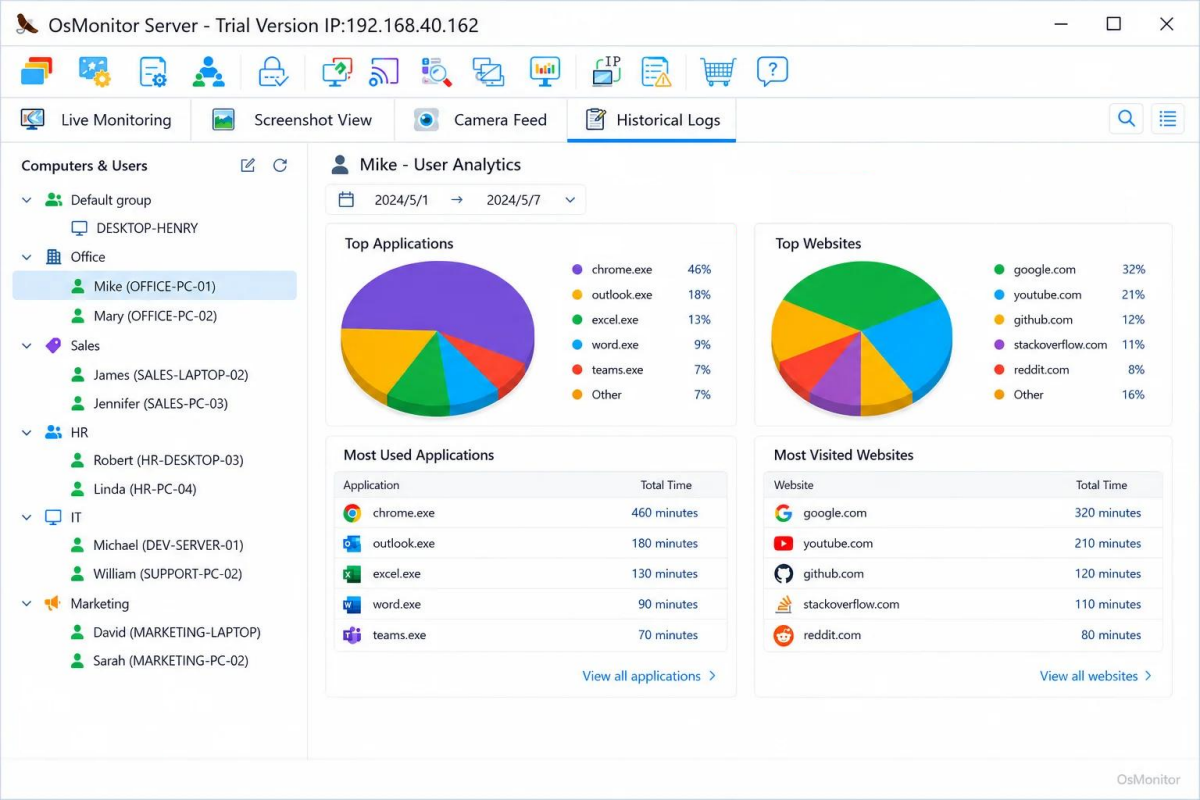
This setup can help IT teams and managers look at activity across all the computers that are supported without having to check each one. It can also make everyday monitoring easier when a company has departments or a bigger office network.
Before buying a solution, businesses need to make sure about the number of devices that are supported, the operating system requirements, and the reporting features available. The administrative controls provided.
On-Premise Data Storage and Local Network Support
Controlling data is a point when choosing workplace monitoring tools. Cloud-based systems usually use facilities, while on-premise options let organizations store monitoring data on their own equipment. For companies that have the IT resources, putting the system on a local network might give more control over where the monitoring data is kept and who can see it. Hosting it yourself also has duties. Companies need to protect the server, handle user access, put in updates, keep backups, and guard the network from people. Keeping data in-house does not get rid of all the security dangers.
How to Choose the Right Employee Computer Monitoring Solution
First find out the problem you want to solve. A small office might only need reports of computer activity. A larger organization might need control of many Windows computers. If your business does not have dedicated IT support, you might need an employee computer monitoring solution that’s easier to deploy and maintain. An employee computer monitoring solution that keeps things simple.
Make a shortlist that matches your needs, not one that simply has the most features.
Compare Long‑term Costs
Then look at the infrastructure you already have. If your business already runs a network and server, an on‑premise employee computer monitoring solution could be useful. The price of an employee computer monitoring solution can change a company’s budget for years. Some vendors charge a yearly fee. Others let you pay once for a license. Paying once might lower repeated licensing costs. You must also think about installation costs, the server hardware required, ongoing maintenance, technical support, and future upgrades. Therefore, look at the cost of owning the Employee Computer Monitoring Solution, not just the first price. Also ask the vendor directly for the license terms before you buy.
Check Compatibility and Ease of Management
Before you deploy, make sure the software works with your computers and network. Verify the minimum system requirements, the installation steps, the reporting choices, and any support resources that are available. A trial or demo can let your team see the interface before you buy. Also try the software on devices before you release it to the entire organization. Doing this early can find issues. Prevent daily work from being affected.
Employee Privacy, Security, and Responsible Monitoring
Employee monitoring must have a legitimate business purpose. Organizations should explain what data they collect, why they collect it, who can see it, and how long it will be kept. Depending on where you’re in the situation, businesses may have to meet specific laws about employee notice, consent, workplace surveillance, and personal data protection. Therefore, employers should review the laws and create a written monitoring policy before they put any monitoring system in place.
Protect Monitoring Data
Monitoring records can contain business information. That’s why only people who are approved and really need it should be able to see them use passwords. Set up access controls. Keep your network secure. Update your software often. Also create a rule for how you keep the data. Do not keep it longer than you need to. Even if you use an on-premise system, you still must protect your setup. Protect it from threats. Good monitoring means having the software and following solid security habits.
Conclusion: Is OsMonitor a Practical Choice for Businesses?
When I choose employee monitoring software, I remember that it is not about catching behavior. When I choose employee monitoring software, I focus on balancing productivity, security, privacy and cost. The best choice solves problems without making things too complicated or breaking trust with employees.
OsMonitor might be a fit for companies that want to monitor Windows computers from one central place. It works well on networks and lets you control where your data is stored. Its one-time license cost may be appealing to businesses that don’t want to pay monthly or yearly fees for software.
Still, every company should check its tech skills, licensing needs, privacy rules, and security goals before deciding. When monitoring is clear, fair, and backed by rules, it can help you understand what’s going on. And still keep your workplace respectful.
Frequently Asked Questions
What Is OsMonitor Used For?
OsMonitor is employee computer monitoring software made to help businesses check what’s happening on computers from one place. It can track screen activity, which apps are being used, what websites are visited, and other work-related computer actions. It works on supported Windows computers.
Can OsMonitor Store Monitoring Data on a Local Server?
Yes, OsMonitor works with a self-hosted client-server setup. This means businesses can keep all monitoring data on their server computer inside their local network. This gives them control over their monitoring system. They also have to make sure the server is secure and well-maintained.
Is Employee Computer Monitoring Software for Small Businesses?
Yes it can be helpful for businesses that want to see more clearly what’s happening with their computer work. Still, owners should think about cost, how hard it is to set up privacy rules, and whether it really adds value before picking a tool.
What Should Businesses Consider Before Choosing OsMonitor?
Before choosing OsMonitor, businesses should check if it works with their Windows computers, what network setup it needs, what features it offers, how the license works, and how data is. Their duty to respect employee privacy. They should also talk to the provider to make sure the current version matches their needs.
About the Author

Mike Zhou is Technology Writer at OsMonitor. He writes about workplace technology, employee productivity, and business software solutions. His articles explore how organizations can use technology to improve operational efficiency, manage computer-based work, and protect business data.